Introduction
The process of learning has evolved significantly over recent years. Students no longer have to suffer on their own while dealing with complex subjects. AI technology is currently being used by students to help them comprehend different concepts, write efficiently, find solutions, and prepare for examinations. Such technologies are similar to intelligent assistants that are always at your service.
No matter whether you are in Class 6 or Class 12, the use of AI technology can ease your school experience. This article focuses on the top AI technologies for school students, along with their features and benefits.
What are AI tools for students?
AI tools refer to software that uses AI to undertake different actions. In the case of students, the AI tools assist them with explaining concepts, checking grammar, solving math problems, making class notes, and many other actions. Most of these AI tools are either free or have a free option that suits students.
The good thing about these AI tools is that one does not need to be tech-savvy to use them. All that you need to do is to enter your problem, and the tool will give an answer.
1. ChatGPT
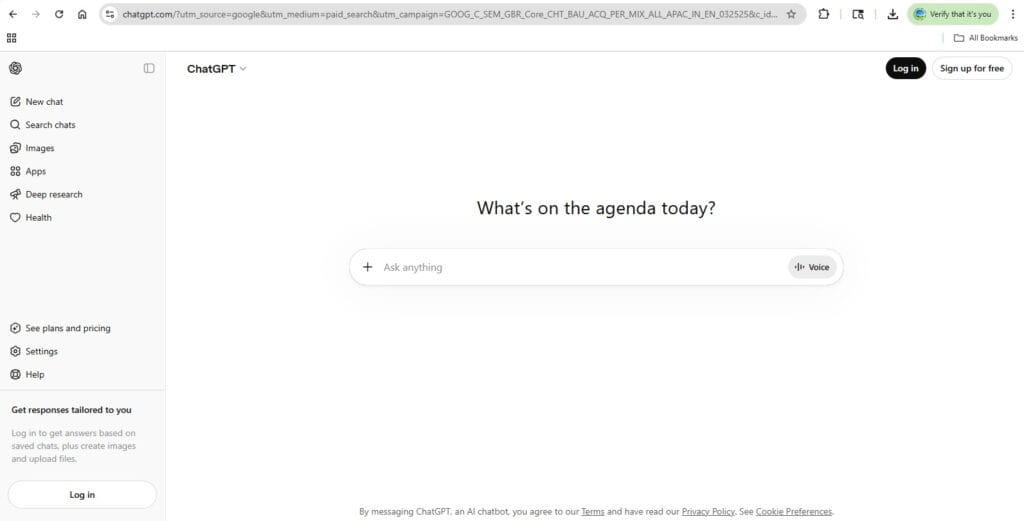
ChatGPT is one of the most widely used AI products globally. The product is developed by a firm known as OpenAI. It helps students gain explanations, write essays, and make complicated subjects easy to comprehend.
Best Use: Gaining explanations, writing assistance, and answering subject-related questions.
Advantages:
- Explain all the concepts in easy and understandable language.
- Available 24/7, which means learning at your convenience.
Disadvantages:
- Provides incorrect information sometimes.
- No new updates in the free version.
2. Google Gemini
Google Gemini is the AI-powered assistant made by Google. Because it integrates with Google Search, its answers will always be current and accurate. It can help students research and summarize their findings and answer questions about their homework.
Best Use: Research, summaries, and staying up to date with information.
Advantages:
- It provides up-to-date data straight from the internet.
- Works seamlessly with other Google services, such as Docs and Drive.
Disadvantages:
- Sometimes the responses are too lengthy and difficult to scan through.
- Needs Google account to work.
3. Microsoft Copilot
Microsoft Copilot is built into Microsoft Edge and works with Bing Search. This is one of the best AI tools for students using Windows machines. It allows you to ask questions, get summarized notes, and even create images.
Best Use: Research, project creation, and text summarization.
Advantages:
- It is free and can be used directly through Microsoft Edge.
- Provides responses with citations, allowing you to verify your facts.
Disadvantages:
- It works only within the Microsoft Edge web browser.
- The image generation capability is limited to a daily quota.
4. Grammarly
Grammarly is a powerful artificial intelligence software designed to help users improve their writing skills by checking their grammar, spelling, and punctuation. It is very helpful for students because they can use it to write assignments and essays.
Best Use: Proofreading your work and improving grammar and spelling.
Advantages:
- Detects grammar and spelling mistakes in real-time.
- Provides clear explanations for each suggestion
Disadvantages:
- Tone checker and plagiarism detector are available only with a subscription.
- Cannot recognize informal or regional writing styles.
5. Quizlet
Quizlet employs artificial intelligence in order to assist students in memorizing knowledge through flashcards, tests, and games. It is one of the best applications to prepare for exams. It enables you to make your own set of study materials or use sets made by other people.
Best Use: Memorization, exam preparation, and learning new words.
Advantages:
- It makes studying entertaining through quizzes and activities.
- There are millions of sets available to study from for free.
Disadvantages:
- Some advanced modes of studying, such as Learn and Test, require subscriptions.
- The quality of content depends on the users creating the sets.
6. Khanmigo
Khan Academy has launched an AI tutor named Khanmigo. It is not a tutor that tells you what the answer is but instead poses questions to guide you towards discovering the answer on your own. In doing so, it actually helps you understand the concept.
Best Use: Mathematics, science, and concept-based learning.
Advantages:
- Instructs using questions, helping students develop their skills.
- Tutors students on many subjects such as mathematics, science, and history.
Disadvantages:
- Available to selected users from specific nations.
- Student must have a Khan Academy account.
7. Canva AI
Canva is a graphic design software program. Its AI technology known as “Magic Write” enables students to make stunning presentations, posters, and infographics within no time.
Best Use: School assignments, presentations, and visual tasks.
Advantages:
- Very fast creation of professional designs even if you have no knowledge of designing.
- Huge range of free templates for projects and assignments in schools and colleges.
Disadvantages:
- Limited use of the Magic Write feature in terms of monthly free usage.
- Designs with huge file sizes may load slower on some older devices
8. Photomath
Photomath is an application that provides a solution to mathematics problems. All you need to do is capture a mathematics question using your smartphone’s camera, and the application gives its solution, step by step.
Best Use: Solving math problems and seeing their step-by-step solutions.
Advantages:
- It provides full steps of working so that one can learn how to arrive at the solution.
- It can work even without an Internet connection when performing simple calculations.
Disadvantages:
- It is designed to solve regular problems but might fail with complicated questions.
- A few students may misuse it through copying solutions.
Guidelines for Using AI Tools
AI tools can be very useful for students, but it is crucial to use them effectively. Below are some guidelines for using them effectively:
- It is vital to validate any information provided by the AI. AI can provide incorrect information.
- AI should help one comprehend the concept; one should not rely solely on the answer provided by the AI tool.
- One should not submit the work generated by the AI software as one’s own unless it aligns with the school’s policies.
- The use of AI tools can significantly benefit learners when used responsibly.
Frequently Asked Questions
Q1. Which is the best free AI tool for school students?
ChatGPT and Microsoft Copilot are among the best free options. Both offer strong features at no cost and work well for most school subjects.
Q2. Can students use AI tools for homework help?
Yes, students can use AI tools to understand topics and get guidance. However, they should use AI to learn, not to complete homework without effort.
Q3. Is Grammarly good for school students?
Grammarly is an amazing tool for students. It helps to enhance their writing skills by identifying any grammatical errors and offering better vocabulary.
Q4. Are AI tools safe for school students?
Most popular AI tools are safe to use. However, students should avoid sharing personal information and always use AI tools on trusted platforms.
Q5. Which AI tool is best for math?
Photomath is the best AI tool for solving math problems. It shows step-by-step solutions that help students understand each calculation clearly.
Conclusion
AI tools have transformed student learning by making studying faster, smarter, and more effective. From improving writing with Grammarly to solving problems with Photomath, they support every subject. The best results come when students use these tools to strengthen their own understanding, not replace it. Start small, stay curious, and make AI a helpful part of your daily study routine.