Introduction
Technology has become an integral part of today’s education system. Nowadays, numerous software solutions are utilized by students to make their studies more effective. On top of that, selecting the most suitable software for you can change your studying methods and boost your performance. The truth is that a lot of students realized that using the right software could increase their efficiency and improve their knowledge of the subject. It is clear that choosing software for yourself has become a critical aspect of succeeding academically. Below we discuss different software products you may consider utilizing.
Why This Post Matters for You
- Learn about three main categories of student software
- Discover specific tools that match your academic needs
- Understand the real benefits each software type provides
- Get practical tips for choosing and using software effectively
- Make informed decisions that save time and improve grades
Educational Software
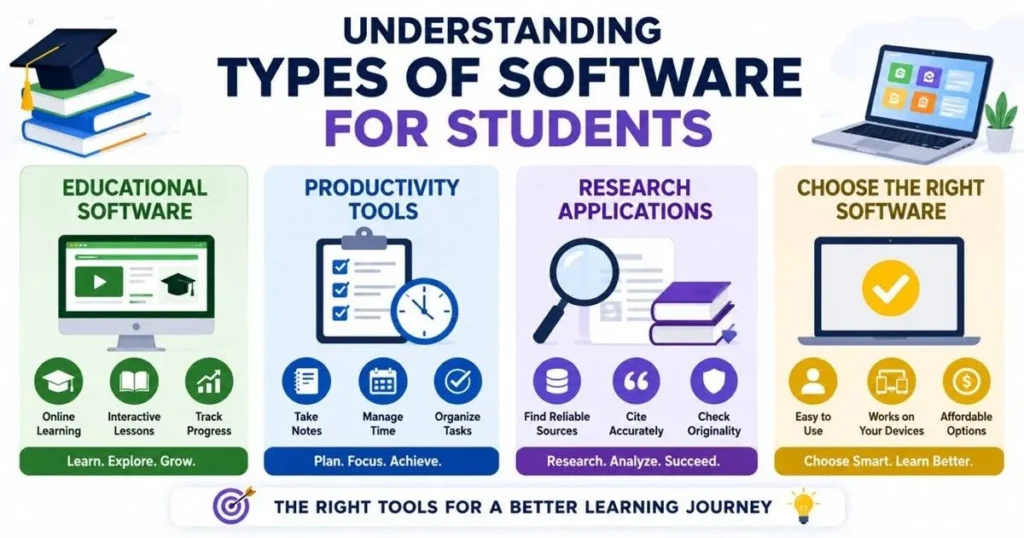
Educational software is designed with the intention to enable the learner to gain knowledge in new concepts. In addition, these systems offer an opportunity for interactive learning in ways that extend beyond the use of books. Above all, these tools adjust according to your rate of learning.
What is Educational Software?
Educational software is described as a type of application or platform that is used for educational purposes. These platforms are generally developed with various features such as quizzes, lectures in the form of video tutorials, and exercises that keep track of progress. In addition, these platforms use different forms of media such as animations, simulation, and gaming.
Popular Educational Software Examples
- Learning Management Systems (LMS): Google Classroom, Moodle, and Blackboard assist teachers in managing courses while students gain access to study materials through them
- Online Course Providers: Khan Academy, Coursera, Udemy, and edX provide courses on practically all subjects available online
- Subject-Specific Learning Apps: Duolingo (languages), Brilliant (STEM), Quizlet (flashcards), and Codecademy (programming)
- Subject-Specific Interactive Applications: PhET Simulations, Khan Academy exercises, and other interactive simulations in particular subjects
Key Features of Quality Educational Software
- Interactive lessons that engage multiple learning styles simultaneously
- Real-time feedback on your performance and understanding
- Progress tracking and detailed analytics of your learning journey
- Multi-device accessibility across laptop, tablet, and smartphone
- Affordable options with many free or low-cost learning platforms
- Personalized paths that adapt to your speed and learning style
- Offline access to continue learning without internet connection
Why Students Should Choose Educational Software
- Engagement and Interest: Makes learning fun and interactive rather than boring and passive
- Personalized Learning: Adapts to your strengths and focuses on areas where you struggle
- Immediate Feedback: Get instant results and explanations to understand mistakes quickly
- Better Retention: Multimedia content and interactive lessons improve memory and understanding
- Visual Explanations: Complex topics become easier through animations and diagrams
- Extra Practice: Unlimited practice problems help you master difficult concepts
- Certification Options: Earn certificates that boost your resume and career prospects
- Confidence Building: Gradual progress tracking motivates and encourages continued learning
- Cost Savings: Many quality platforms offer free or affordable alternatives to expensive tutoring
Productivity Tools
Productivity tools assist in time management, task organization, and focusing on priorities. Furthermore, productivity tools play an important role in organizing classes, homework, and other activities. Besides, productivity tools eliminate stress, as all required information is kept in one easily accessible location. Lastly, productivity tools bring order out of chaos so that one can concentrate on studying.
What Are Productivity Tools?
These are software programs that assist students in managing their time effectively and organizing the information they have gathered. They also allow users to create centers where one stores his notes and deadlines, enabling him to monitor their progress without wasting any time searching for any necessary information. The most important thing about productivity tools is that they ensure accountability and consistency in study habits.
Essential Productivity Tools for Students
- Note-Taking Apps: Evernote, OneNote, Notion, and Apple Notes capture and organize class notes automatically
- Time Management Software: Toggl Track and RescueTime monitor how you spend study time and identify distractions
- Task Organizers: Todoist, Microsoft To Do, Asana, and Trello keep assignments and projects on track
- Calendar Applications: Google Calendar and Outlook help schedule study sessions and track deadlines
- Cloud Storage: Google Drive, Dropbox, and OneDrive ensure your files are always accessible from any device
- Focus and Distraction Blockers: Forest, Freedom, and Cold Turkey help eliminate digital distractions
How These Tools Transform Your Academic Life
- Organization: Keep all notes, files, and assignments in one searchable location
- Time Management: Never miss a deadline with automatic reminders and calendar integration
- Reduced Stress: Know exactly what needs to be done and when it’s due
- Better Focus: Block distracting websites and apps during study sessions
- Collaboration: Share notes and work with classmates on group projects easily
- Accessibility: Access your materials from any device, anywhere, anytime
- Habit Building: Track your progress and maintain consistent study habits
- Accountability: Visible task lists keep you accountable to your goals
- Improved Grades: Better organization and time management directly improve academic performance
- Efficiency: Spend less time organizing and more time actually learning
How to Use Productivity Tools Effectively
- Choose tools that match your style: Pick applications that feel natural and intuitive to you
- Set up a consistent system: Create a standard way for entering tasks and notes immediately
- Review your tasks daily: Spend 5-10 minutes each morning checking your to-do list
- Use reminders wisely: Set notifications strategically to avoid constant distractions
- Update progress regularly: Keep your system current with accurate tracking
- Keep it simple: Don’t use too many tools—simplicity leads to better adoption
- Build in breaks: Schedule rest time between study sessions to prevent burnout
- Review and adjust: Assess what’s working monthly and refine your approach
Tips for Maximizing Your Productivity
1. The Pomodoro Technique:
Study for 25 minutes while concentrating fully, then take a five-minute break. Repeat four times, and then take a 30-minute break. This highly efficient technique helps to concentrate better and minimize exhaustion.
2. Time Blocking:
Dedicate time for studying each topic in the calendar. It helps to get dedicated time for concentration without being interrupted.
3. The Two-Minute Rule
If a task takes less than two minutes, do it immediately. This prevents small tasks from piling up and overwhelming you.
4. Breaking Down Large Projects
Break down large projects into smaller pieces in the productivity app.
Research Applications
The use of research applications assists one in identifying authentic resources, making citations, and managing research activities effectively. Besides, the use of research applications is highly advantageous in the development of essays, projects, and presentations. The use of research applications is also highly important in ensuring that your citations adhere to academic standards. Therefore, using research applications indicates professionalism.
What Are Research Applications?
Research applications are software programs that assist you in finding references and managing your research process. Moreover, these applications make your life easier as they automatically cite references using any style such as APA, MLA, Chicago, and many others. In addition, many research applications allow you to take notes for your sources. However, the best thing about them is that they ensure that you do not commit plagiarism.
Popular Research Tools and Their Benefits
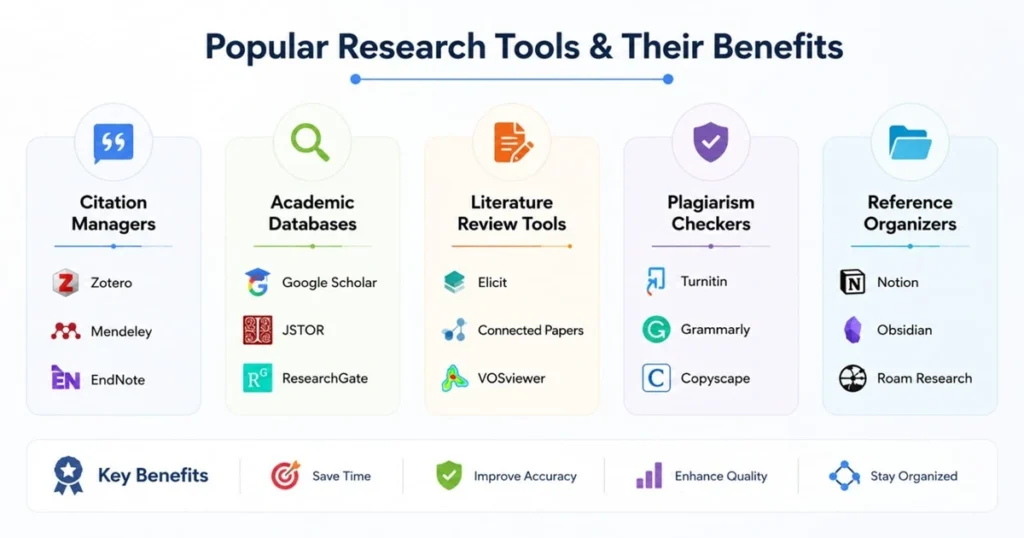
📖 Citation Managers
Zotero, Mendeley, EndNote automatically format citations in APA, MLA, Chicago styles and sync with your word processor
🔍 Academic Databases
Google Scholar, JSTOR, ResearchGate, PubMed provide access to millions of peer-reviewed research papers
🎯 Literature Review Tools
Elicit, Connected Papers, VOSViewer help visualize relationships between research papers and topics
✓ Plagiarism Checkers
Turnitin, Grammarly, Copyscape ensure your work is original and properly cited
📝 Reference Organizers
Notion, Obsidian, Roam Research help store, retrieve, and connect your research notes
Key Features of Quality Research Software
- Automatic citation formatting in multiple academic styles
- Database integration with major academic sources
- Annotation tools for highlighting and noting important passages
- PDF organization with tagging and folder systems
- Collaboration features for group research projects
- Export options to Word, Google Docs, and other platforms
- Mobile access to your research library on the go
- Search functionality within your personal library
Benefits of Using Research Applications
- Time Saving: Automatic citation formatting saves hours of manual work
- Accuracy: Reduces citation errors and formatting mistakes in your papers
- Organization: Keep all your sources in one searchable location
- Plagiarism Prevention: Proper tracking ensures you don’t accidentally plagiarize
- Professional Quality: Papers with proper citations look more professional and credible
- Easy Revision: Quickly update citations across entire documents
- Source Credibility: Academic databases help you find peer-reviewed, reliable sources
- Research Efficiency: Find relevant papers faster using advanced search filters
- Better Understanding: Annotation tools help you engage deeply with research
- Academic Integrity: Demonstrate proper scholarship and ethical research practices
Best Practices for Using Research Applications
- Start research early: Begin your research weeks before your deadline, not days
- Create a system: Organize sources before you begin writing your paper
- Take detailed notes: Record page numbers and key quotes for future citations
- Verify source quality: Always check that sources are peer-reviewed and credible
- Use multiple databases: Different databases have different collections of research
- Save search strategies: Document your search terms for transparency and reproducibility
- Annotate as you read: Highlight key points and add notes while sources are fresh
- Check citations multiple times: Review citations before submitting your work
- Ask librarians: Your school library has experts who can teach you advanced search skills
Choosing the Right Software
With all the software that is available today, picking out which is the right software can be quite difficult to do. But with the help of a systematic method, the process becomes much easier. And the best software is always the one that you will continue using.
Key criteria for selecting software include:
- User-friendliness: Can you learn the software quickly without complicated tutorials?
- Compatibility: Does it work on your devices (computer, phone, tablet)?
- Cost: Can you afford it, or does a free version exist?
- Features: Does it have the tools you actually need for your work?
- Customer support: Can you get help when you face problems?
- Security: Does it protect your personal information safely?
- Integration: Can it connect with other software you already use?
Moreover, user friendliness should be taken into consideration. If something is very easy to use, then you will not have any problems using the application. Thus, always opt for those programs that have simple interfaces and guidelines. Furthermore, the compatibility factor comes into play in determining whether you will have access to all your work irrespective of the devices used. This is because you need to look at the system requirements before installing anything on your computer.
To evaluate software effectively, follow these steps:
- Read reviews from other students on trusted websites
- Watch YouTube tutorials to see how the software works
- Try free trials before making purchase decisions
- Ask teachers and friends about their favorite tools
- Make lists comparing features and prices
- Test the software with a small project first
Moreover, the features must suit your requirements. At times, software with more features does not work as effectively as one with fewer, but that is more user-friendly. Support services become vital during technical troubles. Therefore, software with prompt support services.
Conclusion:
The selection of appropriate software can significantly enhance one’s grades and help in improving the entire learning process. Learning, productivity, and research software have distinct roles in assisting students in their studies. While selecting software, students should consider their personal learning preferences, budget, and devices they can use. Because there is not an ideal software for everyone, it becomes essential to experiment with various programs and try out free ones first. In many cases, schools offer premium software; thus, it is worth checking the options offered by the institution. Remember that software is merely a means to an end.
Frequently Asked Questions
Q1: Do I really need educational software, or will textbooks suffice?
While textbooks remain valuable, educational software offers interactive learning experiences that textbooks cannot provide. Moreover, software adapts to your pace and learning style. However, the best approach combines both—use textbooks for deep reading and software for practice and concept reinforcement.
Q2: Which productivity tool is best for managing multiple classes?
The best tool depends on your personal preferences and how your brain works. That said, Notion and Todoist are popular choices because they’re flexible and comprehensive. Additionally, Google Calendar combined with Google Tasks offers excellent free alternatives.
Q3: Are free research applications reliable compared to paid ones?
Yes, many free research tools are highly reliable. For instance, Google Scholar and Zotero are excellent free options used by students and professionals worldwide. Consequently, you don’t need to spend money to access quality research resources.
Q4: Can using too many software tools actually decrease my productivity?
Absolutely, this is called “tool overload.” In fact, managing multiple tools often creates more work than it eliminates. Therefore, start with just two or three essential tools that address your main needs. Subsequently, add more tools only if you identify specific gaps they can fill. The key principle is simplicity—fewer tools used consistently beats many tools used sporadically.
Q5: How do I know if software is worth the subscription cost?
Calculate the value using this simple question: Will this software save more than X hours per month compared to not using it? Can I achieve my goals without it? Try the free version or trial first. Furthermore, check if your school provides free access as a student benefit—many premium tools are available free to students.