
1. What is a Computer?
Introduction to Computer – Class 6
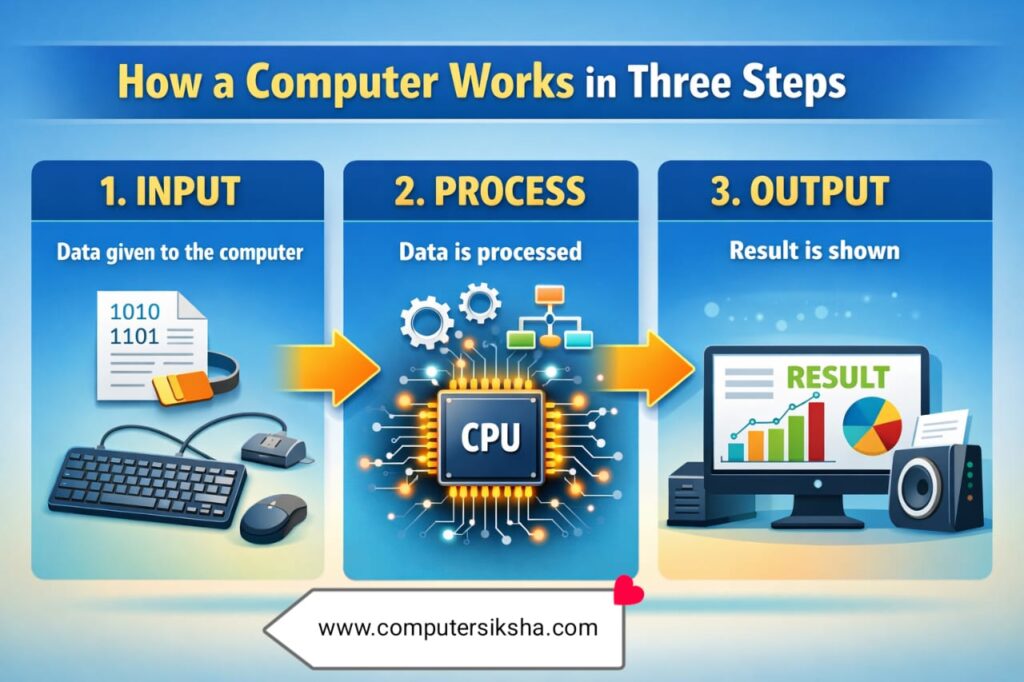
A computer is an electronic device that accepts data as input, processes it, and then produces meaningful output. Moreover, it can store large amounts of information and retrieve that information whenever needed. The word “computer” comes from the Latin word computare, which means “to calculate.”
However, a modern computing device does much more than simple calculation. It plays music, runs applications, connects users to the internet, and even helps doctors diagnose diseases. Consequently, computers have become one of the most important and powerful tools in human history.
Every computer follows the IPO cycle — that is, Input → Process → Output. As a result, every single task that a device performs follows this three-step cycle automatically, whether the task is simple arithmetic or complex video rendering.
2. Uses of Computer
Computers serve countless purposes in the modern world. In fact, almost every field depends on these devices to function efficiently. Below are the most important areas where they are used:
Education
Students and teachers use computing devices for online learning, digital assignments, research, and interactive lessons. Furthermore, e-learning platforms allow students to study at their own pace from anywhere. As a result, education has become more accessible to children in remote areas.
Healthcare
Doctors and hospitals use these systems to store patient records, conduct diagnostic scans, and monitor treatment progress. Moreover, modern medical equipment such as MRI machines and ECG monitors runs entirely on computing technology. Therefore, healthcare has improved significantly in quality and speed.
Banking and Finance
Banks process millions of transactions every day using powerful computer systems. Additionally, online banking allows customers to transfer money, pay bills, and check balances from their mobile phones. Consequently, financial services have become faster, safer, and available around the clock.
Entertainment
Movies, video games, music streaming, and social media all depend on computing devices to deliver content to users. Furthermore, animation studios use high-performance systems to create the visual effects seen in modern films. As a result, the entertainment industry has transformed into a fully digital experience.
Industry and Manufacturing
Factories and manufacturing units use automated computer-controlled machines to improve production speed and reduce errors. Moreover, supply chain management software helps businesses track inventory and deliveries in real time. Therefore, industrial efficiency has grown dramatically over the past two decades.
Communication
Email, video calls, and social media platforms allow people to communicate across the globe in seconds. Furthermore, devices connected to the internet have made it possible for businesses to work with teams spread across different countries. Consequently, the world has become a much more connected place because of this technology.
In addition to the above, these devices help scientists analyze complex data, assist architects in designing buildings, and guide spacecraft in outer space. As a result, their importance in every area of society continues to grow at a remarkable pace.
3. Parts of a Computer
A complete system consists of two main parts — hardware and software. Both are equally important, and they work together to make the device function properly. Without either one, the system cannot operate at all.
Hardware
Hardware refers to all the physical parts of a system that you can touch and see. In other words, hardware includes every component that has a physical form, such as the screen, keyboard, and circuit boards. The following are the main hardware components found in a typical desktop setup:
- Monitor – the display screen that shows output to the user
- Keyboard – an input device used to type letters, numbers, and commands
- Mouse – a pointing device that controls the cursor on screen
- CPU (Central Processing Unit) – the processing unit that executes all instructions
- Hard Disk – permanent storage that holds the operating system and files
- RAM (Random Access Memory) – temporary memory used while tasks are running
- Printer – an output device that produces physical copies of digital documents
- Speaker – an output device that produces audio
Software
Software, on the other hand, refers to the programs and instructions that run on the hardware. You cannot physically touch software, but without it, the hardware is completely useless. Software tells the hardware what to do and how to do it. The following are common examples of software used today:
- Microsoft Windows – an operating system that manages the hardware and runs other programs
- Microsoft Word – a word processing application used for writing and editing documents
- Google Chrome – a web browser used to access the internet
- VLC Media Player – a media player for watching videos and listening to music
- Adobe Photoshop – an image editing application widely used by designers
- Antivirus programs – security software that protects the system from harmful threats
- Python – a programming language used to write custom programs and scripts
Key Point: Hardware is like the body of a computing system, while software is its soul. Consequently, both must work together for the device to perform any task correctly and efficiently.
4. Main Components of a Computer
Every computing system has four essential components. These work together to complete tasks efficiently and reliably. Let us understand each one in detail below.
| Component | Type | Function |
|---|---|---|
| Monitor | Output Device | Displays information and results on screen so that the user can see the output clearly. |
| Keyboard | Input Device | Allows users to type letters, numbers, and commands to give instructions to the system. |
| Mouse | Input Device | Controls the pointer on screen and helps select, click, and drag items with ease. |
| CPU | Processing Unit | Acts as the brain of the system and performs all calculations, decisions, and coordination. |
Among all the components listed above, the CPU (Central Processing Unit) is the most important. Therefore, it is commonly called the “brain” of the system. It processes every instruction and coordinates all other components to work together smoothly. Moreover, a faster CPU means the system can handle more tasks in less time, which is why processor speed is such an important specification when buying any device.
5. Types of Computers
Computing devices come in several different types, and each type is designed for a specific purpose. As a result, different devices suit different environments and user needs. Understanding these types helps students choose the right tool for the right job.
Desktop Computer
A desktop is a stationary computing device that is typically placed on a desk or table. It is ideal for use in offices, schools, and homes where portability is not required. Moreover, desktops are generally more powerful and easier to upgrade than other types, which makes them a popular choice for heavy tasks such as video editing or gaming.
Laptop Computer
A laptop is a portable computing device that combines a screen, keyboard, and battery into a single compact unit. Because it runs on battery power, users can carry it and work from anywhere. Furthermore, laptops are widely used by students, professionals, and travellers who need a full-featured system on the go.
Tablet
A tablet is a thin, lightweight touchscreen device that is easier to carry than a laptop. It is commonly used for reading, browsing the internet, and watching videos. However, tablets are less powerful than desktops and laptops, so they are better suited for light tasks rather than heavy processing work.
Mainframe Computer
A mainframe is a large and extremely powerful computing system used by big organisations such as banks, government agencies, and airlines. It can process enormous amounts of data at once and support thousands of users simultaneously. Consequently, mainframes are essential for running critical national and financial systems.
Supercomputer
A supercomputer is the fastest and most powerful type of computing device in the world. Scientists and researchers use supercomputers to perform complex calculations in fields such as weather forecasting, space exploration, and nuclear research. For example, India’s supercomputer called PARAM Siddhi is used for advanced scientific research by government institutions.
Wearable Devices
Smartwatches and fitness trackers are small wearable devices that contain embedded computing chips. Although they are tiny, they run software, process data, and connect to the internet just like larger devices. Therefore, even a wristwatch today can be considered a miniature computing device.
Furthermore, today’s smartphones are so powerful that they function as full miniature computers. Consequently, billions of people around the world carry a capable computing device in their pocket every single day without even thinking about it.
6. Advantages and Disadvantages of Computers
Like every tool, these devices have both positive and negative sides. Therefore, it is important to understand both so that we can use technology wisely and responsibly in daily life.
Advantages
The major benefits of using a computing device are listed below:
- Speed: A computer completes millions of calculations per second, far faster than any human being can manage manually.
- Storage: It can store vast amounts of data — documents, photos, videos, and programs — in a small physical space.
- Accuracy: When given correct instructions, the system performs tasks with extremely high precision and without arithmetic errors.
- Connectivity: Through the internet, it connects people, businesses, and governments across the entire world instantly.
- Automation: Repetitive and boring tasks such as data entry or report generation can be fully automated, saving time and effort.
- Availability: Unlike human workers, these devices can operate twenty-four hours a day without rest or fatigue.
Disadvantages
Despite the many benefits described above, there are also some important disadvantages to be aware of:
- Health Issues: Long hours of screen use can cause eye strain, headaches, and back pain, particularly in young students.
- Addiction: Excessive use of social media, video games, and streaming apps can lead to internet addiction and poor concentration.
- Cybercrime: Important personal data can be stolen by hackers if the system is not properly secured with passwords and antivirus software.
- Reduced Physical Activity: Spending too much time at a screen reduces time spent on physical activity, which can harm health over time.
- Misinformation: False news and misleading content can spread very rapidly through social media and messaging apps.
- Cost: Buying, maintaining, and upgrading a computing device can be expensive, especially for families with limited income.
However, using these devices in a balanced and careful way allows us to enjoy the benefits while minimising the risks. Therefore, it is wise to take regular screen breaks, follow safe browsing habits, and always protect personal information when using the internet.
8. Computer in Daily Life
Computing devices have become a vital part of our everyday routine. In fact, from the moment we wake up to the time we go to sleep, these devices play a role in our lives whether we notice it or not. The following examples show how deeply integrated they have become in our daily activities.
Morning Routine
Many people wake up to a smart alarm that runs on a phone or a connected speaker. Furthermore, people check the morning news, weather updates, and social media feeds through apps powered by computing systems. As a result, technology is often the first thing we interact with each day.
Transportation and Shopping
Cab booking applications use GPS and real-time mapping software to connect riders with drivers within minutes. Moreover, online shopping platforms allow users to browse millions of products, compare prices, and place orders from home. Additionally, digital payment systems powered by secure computing networks have replaced the need to carry physical cash in many situations.
Education and Work
Schools now use smart boards, digital textbooks, and e-learning apps that run on computing devices. Similarly, offices use productivity software to manage tasks, communicate with teams, and analyse business data. Consequently, both learning and working have become more efficient and flexible because of this technology.
Entertainment and Communication
Music streaming, video calls with family and friends, and online gaming are all powered by computing infrastructure. Furthermore, video chat applications allow people to see and speak to each other in real time, no matter how far apart they are physically. Therefore, relationships can be maintained even across great distances thanks to this technology.
Public Infrastructure
Traffic signals, ATMs, hospital equipment, and even microwave ovens contain embedded computer chips that control their operation. Moreover, power grids, railway booking systems, and water supply networks are all managed through centralised computing systems. As a result, our entire modern infrastructure depends on these devices to operate smoothly and without interruption.
Interesting Fact: The device you use at school to type an essay uses the same basic working principles as the supercomputers NASA uses to plan Mars missions. Therefore, learning about this technology today is truly preparing yourself for the future of tomorrow.
Conclusion
A computer is a remarkable electronic device that has transformed every aspect of human life over the past few decades. Furthermore, understanding its parts, types, uses, and overall impact helps us become smarter, safer, and more responsible users of technology.
Therefore, as a Class 6 student, learning about this subject is not just about passing exams — it is about preparing for a world that is becoming increasingly digital every year. Moreover, the knowledge and habits you develop today will directly shape how well you are able to use, understand, and contribute to the technology-driven world of tomorrow.
Frequently Asked Questions
1. What is a computer in simple words?
A computer is an electronic device that takes input from the user, processes it following a set of instructions, and then produces useful output.
2. What are the main parts of a computer?
The main parts are the Monitor (output), Keyboard and Mouse (input), CPU (processing), and Hard Disk or RAM (storage). Moreover, each part has a specific role, and all of them must work together for the system to function correctly.
3. What is the difference between hardware and software?
Hardware refers to the physical parts you can see and touch, such as the keyboard and monitor. Software, on the other hand, refers to the programs and instructions that run on the hardware, such as Windows or MS Word.
4. Why is the CPU called the brain of the computer?
The CPU processes all instructions and controls every other component in the system, just like a human brain controls all the functions of the body. Therefore, it is widely referred to as the brain of the entire computing system.
5. What are the advantages of using a computer?
These devices work with great speed and accuracy, store large volumes of data, reduce manual work, and connect people worldwide through the internet. Furthermore, they automate repetitive tasks and are available to work twenty-four hours a day without any breaks.
6. What are the disadvantages of computers?
Excessive screen time can cause eye strain, back pain, and reduced physical activity. Additionally, these systems can be misused for cybercrime, data theft, and the rapid spread of false information online.
7. What are the different types of computers?
The main types include Desktop, Laptop, Tablet, Mainframe, and Supercomputer. Furthermore, smartphones and wearable devices such as smartwatches are also considered miniature computing devices because they run software and process data just like larger systems.