1. Introduction to Computer Security
Computer security refers to the protection of computer systems, networks, and stored data from theft, damage, or unauthorized access. Therefore, it plays a vital role in today’s digital world. Consequently, every computer user must understand its importance and follow safe practices at all times.
Moreover, computer security ensures that information stays private and that systems continue working correctly. In addition, it protects personal files, bank details, and private messages from reaching the wrong hands. Furthermore, good security practices prevent costly damage to both hardware and software.
The CIA Triangle of Computer Security
Computer security is built on three main principles, often called the CIA triangle. First, Confidentiality means that only authorized users can access data. Second, Integrity means that data stays accurate and unchanged. Third, Availability means that systems must work whenever they are needed.
Advantages:
- Protects private and financial information from hackers and criminals.
- Ensures the smooth running of the system without any interference.
Disadvantages:
- Loss of data can cause financial losses and identity theft
- Poor security harms the reputation of companies.
2. Threats to Computers
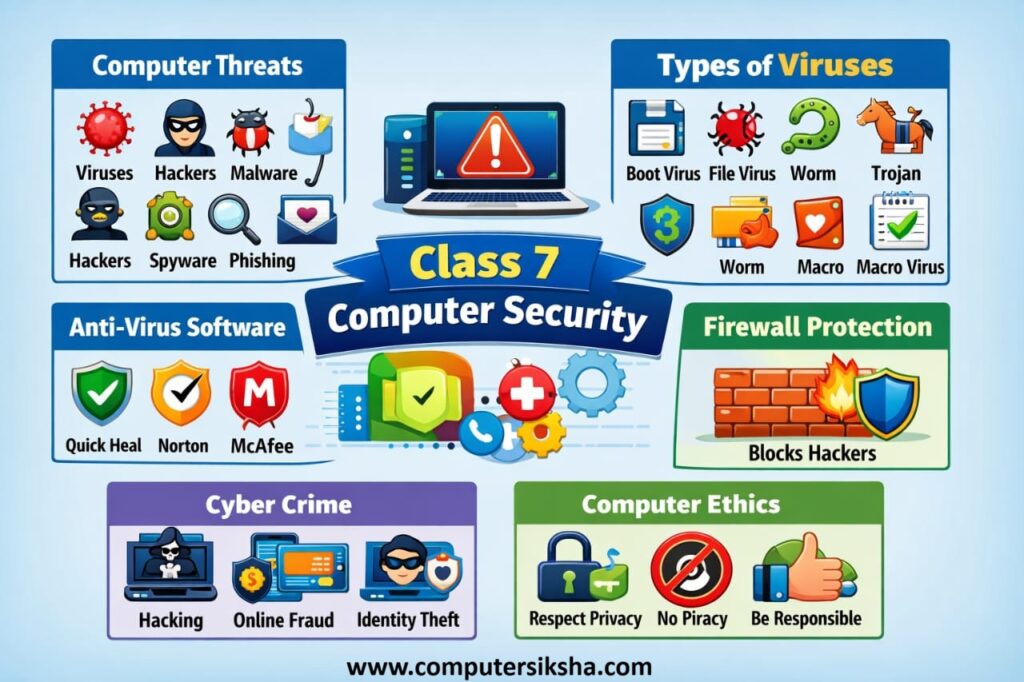
A threat is anything that can cause harm to a computer system or its data. Additionally, threats can come from many different sources — both online and offline. Consequently, understanding these threats helps us stay prepared and safe in the digital world at all times.
First and foremost, hackers try to break into computers without the owner’s permission. Furthermore, malicious software can damage files and steal sensitive information. In addition, physical threats such as fire, floods, and power failures can also destroy hardware and stored data. Therefore, we must guard against both digital and physical risks.
Common Computer Threats
- Malware: Harmful programs that damage or disable your computer system.
- Phishing: Fake emails or websites that trick you into sharing personal information.
- Spyware: Programs that secretly record your activity without your knowledge.
- Power Failure: Sudden shutdowns that can damage unsaved data and hardware.
- Unauthorized Access: When someone logs into your device or account without permission.
Advantages:
- You can recognize danger before it causes damage.
- Awareness helps you choose better security tools and practices.
3. Computer Viruses
A computer virus is a harmful program that attaches itself to a file or software. Subsequently, it copies itself and spreads to other files automatically. Moreover, it can delete important data, slow down your computer, or even crash the entire system completely.
Viruses spread in many ways. For instance, they travel through infected USB drives, email attachments, and unsafe websites. In addition, downloading files from untrusted sources is another common way viruses enter a device. Therefore, you must always be careful about what you download and open.
How Viruses Spread
- Through infected USB drives or memory cards.
- Through email attachments from unknown senders.
- By downloading software from untrusted or pirated websites.
- Through shared network drives without proper security settings.
4. Types of Computer Viruses
There are several types of computer viruses, and each works differently. Furthermore, each type targets a specific part of the computer system. Therefore, knowing each type helps you better protect your device and valuable data.
| Type | How It Works | Real Example |
|---|---|---|
| Boot Sector Virus | Attacks the startup area of a disk so the computer cannot start properly. | Michelangelo Virus (1991) – activated on March 6 and erased hard disk data. |
| File Virus | Infects .exe or .com files. Consequently, programs stop working correctly. | Jerusalem Virus – deleted files every Friday the 13th. |
| Macro Virus | Hides inside Word or Excel documents. As a result, it spreads when files are shared. | Melissa Virus (1999) – spread through infected Word documents via email. |
| Worm | Travels through networks and copies itself without any human action. | Conficker Worm (2008) – infected millions of Windows PCs across the world. |
| Trojan Horse | Looks like a useful program but secretly harms your computer from inside. | Zeus Trojan – stole banking passwords from infected computers silently. |
Advantages:
- It helps you pick the correct form of antivirus protection for the respective threat.
- They know the behaviors to avoid like opening email attachments.
Disadvantages:
- They may lead to permanent loss or damage of important files.
- They decrease computer speed performance.
5. Anti-Virus Software
Anti-virus software is a program that finds and removes viruses from your computer. Therefore, it acts like a security guard that constantly watches over your entire system. Furthermore, it protects your computer in real time, meaning it works all the time — even when you are not actively using your device.
Uses of Antivirus Software
- Scans all the files that enter the computer or e-mail messages for any threat before they can cause harm.
- Constantly updates its software to combat new viruses.
- Updates itself regularly to fight the newest and latest virus threats effectively.
- Secures your personal information from any attempts at theft by spyware.
Examples:
There are many trusted antivirus programs available today. Avast and AVG are popular free options for home users. Norton and McAfee offer strong paid protection for personal and business computers. Kaspersky and Bitdefender are widely used in schools and offices. Windows Defender is a built-in free antivirus tool that comes with every Windows 10 and 11 computer.
Advantages:
- Automatic detection and removal of threats that require no intervention on behalf of the user.
- Real-time protection prevents any threat from affecting the system.
Disadvantages:
- Antivirus scanning may affect the overall speed of the computer while operating.
- Purchasing antivirus software is costly for students and individual users.
6. Firewall and Its Use
A firewall is a security system that monitors and controls the flow of network traffic between your device and the internet. Specifically, it acts as a strong barrier between a trusted private network and an untrusted outside network. Therefore, it effectively prevents unauthorized access to your computer at all times.
A firewall checks every data packet that tries to enter or leave your computer. If a packet does not meet the security rules, the firewall blocks it immediately. Consequently, your computer stays protected from hackers and harmful connections even when you are browsing the internet.
Uses of Firewall
- Blocks unauthorized incoming connections from the internet automatically.
- Filters harmful data packets before they reach your computer system.
- Monitors and logs all network activity for safety review by administrators.
- Prevents hackers from gaining access to your personal computer or network.
Advantages:l
- Prevents hackers from getting into your computer via your networks.
- Runs silently and does not interfere with the functioning of your computer.
Disadvantages:
- A firewall does not remove any viruses that might have already entered your computer system.
- A firewall cannot protect against attacks coming internally from other systems on the same network.
Remember: A firewall does not replace antivirus software. Instead, both tools work together as a team. In other words, antivirus removes viruses already inside, while a firewall stops threats from entering in the first place.
7. Cyber Crime
Cybercrime refers to illegal activities that criminals carry out using computers and the internet. Additionally, cyber crimes affect individuals, businesses, and even entire governments around the world. Therefore, understanding cyber crime helps you stay alert and safe in all your online activities at all times.
Types of Cyber Crime
- Phishing: Sending fake emails or messages to steal passwords and personal information from victims.
- Hacking: Breaking into computer systems without the owner’s permission or knowledge.
- Online Fraud: Cheating people to steal money through fake internet transactions and websites.
- Cyberbullying: Harassing or threatening others online using digital devices and social media platforms.
- Identity Theft: Stealing someone’s personal information to use it for criminal activities.
Advantages:
- Being aware helps individuals identify and protect themselves from online scams and fraud.
- Educational institutions and parents should help their children to stay safe online.
Disadvantages:
- A financial loss suffered by an individual because of online fraud may be extremely huge.
- Mental trauma caused to a victim through cyberbullying is indeed significant.
Fortunately, laws exist in most countries to punish cyber criminals. In India, the Information Technology Act 2000 deals with cyber crimes. Furthermore, you can protect yourself by using strong passwords, avoiding unknown links, and never sharing personal information online with strangers.
8. Computer Ethics
Computer ethics refers to the set of moral guidelines that govern the proper use of computers and the internet. In other words, ethics teaches us right from wrong in the digital world. Therefore, every computer user must follow these important principles carefully and consistently.
Important Computer Ethics
- Do not copy or use someone else’s software, music, or content illegally.
- Respect the privacy of other users’ data and personal files at all times.
- Use the internet honestly and responsibly without spreading false information.
- Never hack into or damage others’ computer systems for any reason.
Advantages:
- Creates a safe, respectful, and honest digital environment for all users.
- Reduces the risk of legal trouble caused by misuse of digital resources.
Disadvantages:
- Piracy and plagiarism harm creators financially and professionally.
- Misuse of information might constitute an ethical violation of privacy laws.
Ultimately, good computer ethics makes the digital world a safer and better place for everyone. Moreover, following these principles builds trust and respect among all computer users worldwide. Consequently, you become a responsible and valued digital citizen in today’s connected world.
Conclusion
Computer security is essential for every student in today’s digital age. Throughout this chapter, we learned about common threats such as malware, phishing, and power failures. We also studied different types of viruses — including boot sector viruses, worms, and Trojan horses — along with real-world examples of how they caused damage. Furthermore, we understood how antivirus software and firewalls protect our devices and why both are needed together. Additionally, we explored the serious effects of cyber crimes like phishing, hacking, and cyberbullying. Finally, we learned why computer ethics are important for responsible and honest use of technology.