What is a Computer?
Introduction to Computer Class 6:
A computer is an electronic machine that accepts data as input, processes it according to given instructions, and produces meaningful information as output.
In simple words, a computer works in three steps:
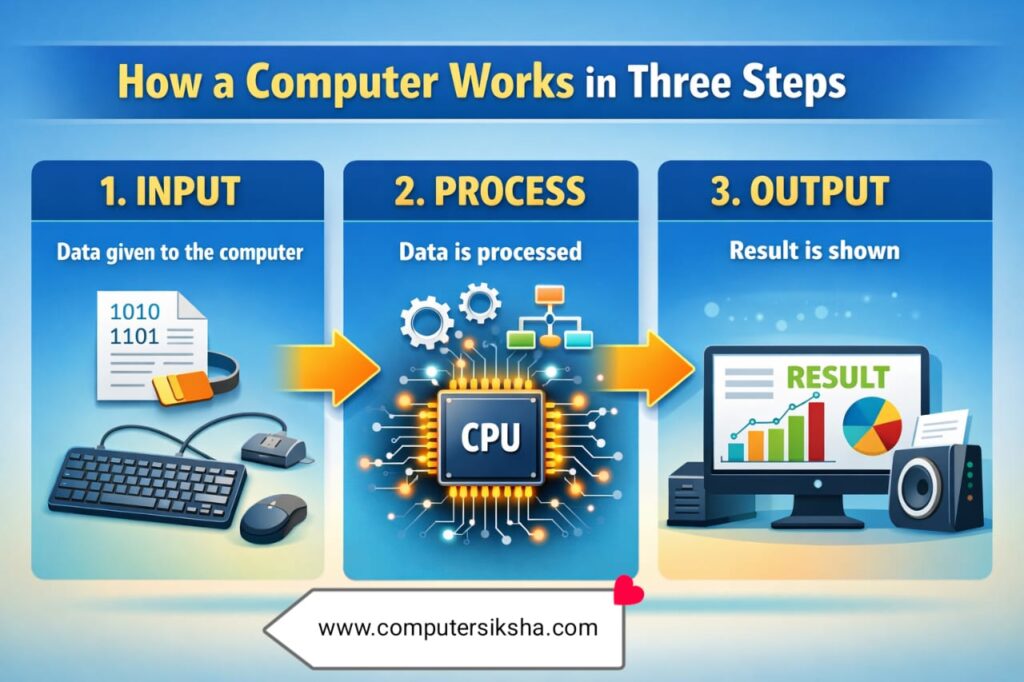
- Input – Data given to the computer
- Process – Data is processed
- Output – Result is shown
This process is called the IPO Cycle (Input–Process–Output), which is an important topic in Introduction to Computer Class 6.
Uses of Computer
Computers are used in almost every field of life. Some important uses are:
- Education – Online classes, exams, projects
- Office Work – Documents, emails, presentations
- Banking – Online banking, ATM services
- Healthcare – Patient records, medical tests
- Entertainment – Games, movies, music
- Communication – Email, video calls, chatting
Parts of a Computer
A computer has two main parts:
Hardware
Hardware refers to the physical parts of a computer that we can see and touch.
Examples:
- Monitor
- Keyboard
- Mouse
- CPU
- Printer
- Speake
Software
Software is a set of instructions or programs that tell the computer what to do.
Examples:
- Windows
- MS Word
- Paint
- Chrome Browser
Main Components of a Computer
Monitor
- It is called the output device
- It displays text, images, and videos
Keyboard
- It is an input device
- Used to type letters, numbers, and symbols
Mouse
- An input device
- Used to click, drag, and select items
CPU (Central Processing Unit)
- Known as the brain of the computer
- It processes all data and instructions
Types of Computers
Based on size and use, computers are of different types:
- Desktop Computer – Used at homes and offices
- Laptop – Portable computer
- Tablet – Touch screen device
- Smartphone – Pocket-size computer
- Supercomputer – Used for weather forecasting and space research
Advantages of Computer
- Very fast and accurate
- Stores large amount of data
- Saves time and effort
- Makes work easy and efficient
Disadvantages of Computer
- Health problems (eye strain, back pain)
- Addiction to games and internet
- Risk of data thef
Computer in Daily Life
Today, life without a computer is impossible. From students to professionals, everyone depends on computers for learning, working, and communication.
Summary
- Computer is an electronic machine
- Works on Input → Process → Output
- Has hardware and software
- Used in education, banking, hospitals