Introduction
Fundamentals of Computer – Class 6 is an important chapter. Computers are everywhere — in schools, homes, hospitals, and workplaces. Yet most students rarely stop to ask, “How did computers actually begin?” In this post, you will explore the fascinating journey of computers—from ancient counting tools to today’s powerful machines. You will also discover computer languages, software types, memory, and printers in a way that is simple, clear, and easy to remember.
History of Computers
Early Computing Devices
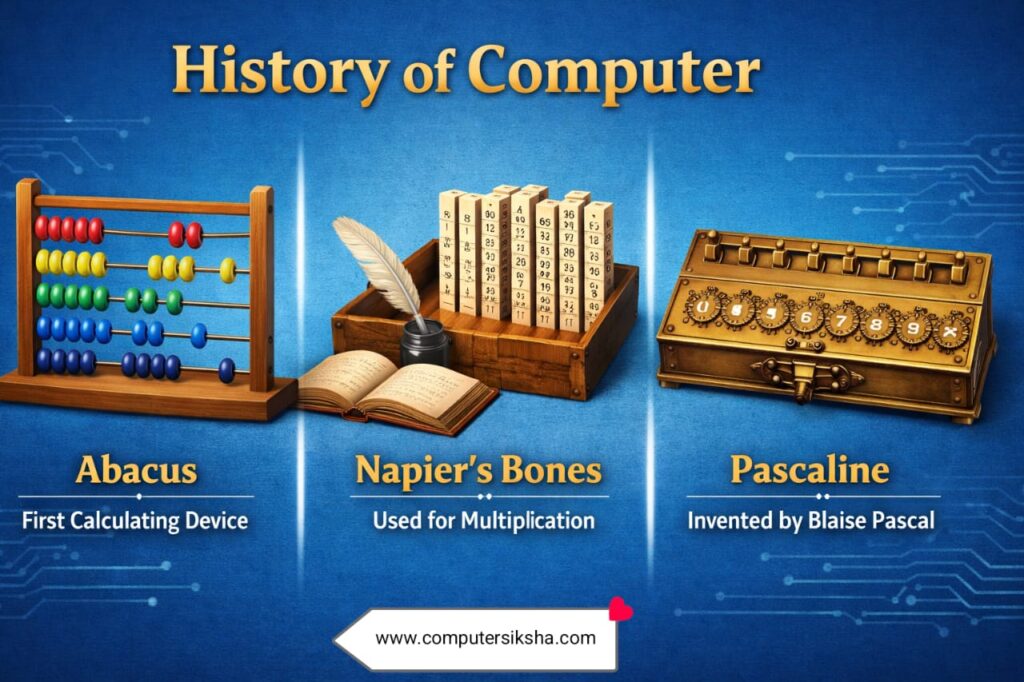
The Abacus, invented around 2400 BCE, was the world’s first calculating tool. People used it to add and subtract numbers by sliding beads along rods. Later, in 1642, Blaise Pascal built the Pascaline — a mechanical calculator that could add numbers automatically. Furthermore, Charles Babbage designed the Difference Engine and Analytical Engine in the 1800s, earning him the title “Father of the Computer.”
Additionally, Ada Lovelace wrote the first algorithm intended for a computing machine, making her the world’s first programmer. Consequently, both Babbage and Lovelace laid the foundation for the digital computers we use today.
Generations of Computers
Computer scientists divide the history of computers into five generations. Each generation brought major improvements in size, speed, and efficiency. As a result, computers became smaller, faster, and more affordable over time.
- 1st Generation (1940–1956): Used vacuum tubes. Very large and slow. Consumed enormous power. Example: ENIAC.
- 2nd Generation (1956–1963): Replaced vacuum tubes with transistors. Smaller, faster, and more reliable.
- 3rd Generation (1964–1971): Introduced Integrated Circuits (ICs). Therefore, computers became even smaller.
- 4th Generation (1971–Present): Microprocessors arrived. Personal computers became available to everyone.
- 5th Generation (Present & Future): Focuses on artificial intelligence and machine learning. Computers can now think!
Quick Fact: ENIAC, the first general-purpose computer, weighed 27 tonnes and filled an entire room. Today, a smartphone is a million times more powerful and fits in your pocket!
Computer Language
Just as humans use languages like English and Hindi to communicate, systems use their own special languages to understand instructions. These programming languages help us tell the system exactly what to do.
Types of Computer Language
Machine Language
Uses only 0s and 1s (binary). Computers understand it directly, but humans find it very difficult to read or write.
Assembly Language
Uses short codes like ADD and MOV. Easier than machine language but still complex for most users.
High-Level Language
Uses English-like words. Examples include Python, Java, and C++. It is the easiest type of language to learn and use.
Consequently, high-level languages are the most popular today because they are simple to write, read, and debug. Moreover, a special program called a compiler or interpreter translates high-level language into machine language so the system can execute it.
Software and Its Types
Software refers to the set of instructions that tells a computer what to do. Without software, a computer is simply a useless box of hardware. Therefore, programs plays a crucial role in making computers functional and useful.
1. System Software
This manages the basic functions of a computer. It acts as a bridge between the hardware and the user. The most important type of system software is the Operating System (OS).
Examples:
- Windows 11
- macOS
- Linux
- Android
- iOS
- Device Drivers
2. Application Software
Application software helps users perform specific tasks. For instance, you use application software when you type a document, browse the internet, or play a game. Furthermore, application software runs on top of system software.
Examples:
- MS Word
- Google Chrome
- VLC Player
- Photoshop
- Calculator App
- Zoom
Remember This
- System software controls the computer hardware.
- Application software helps users complete everyday tasks.
- Both types of software work together to make your system useful.
Computer Memory
Memory is the component that stores data and instructions inside a computer. Without memory, a computer cannot remember anything — not even your files or programs. Therefore, memory is one of the most essential parts of a computing device.
Types of Computer Memory
| Feature | Primary Memory | Secondary Memory |
|---|---|---|
| Also Known As | Main Memory | Auxiliary / External Memory |
| Speed | Very fast | Slower than primary |
| Storage | Temporary | Permanent |
| Cost | Expensive | More affordable |
| Examples | RAM, ROM, Cache | Hard Disk, Pen Drive, CD, SSD |
Primary Memory
Primary memory is directly accessible by the CPU. RAM (Random Access Memory) temporarily stores data while you work. As a result, when you switch off the computer, RAM loses all its data. On the other hand, ROM (Read Only Memory) stores permanent instructions that cannot be changed easily.
Secondary Memory
Secondary memory stores data permanently even after the computer shuts down. For example, your music files, videos, and documents stay saved on the hard disk. Moreover, portable secondary storage devices like USB pen drives allow you to carry data from one system to another easily.
Different Types of Printers
A printer is an output device that produces a hard copy of digital documents. In other words, it transfers data from a computer onto paper. Printers fall into two main categories based on how they print.
Impact Printers
These printers physically strike a ribbon against paper to produce text. Although they are noisy, they are cost-effective for bulk printing.
- Dot Matrix Printer
- Daisy Wheel Printer
- Line Printer
Non-Impact Printers
These printers do not touch the paper directly. Therefore, they are quiet, fast, and produce high-quality output.
- Laser Printer
- Inkjet Printer
- Thermal Printer
Exam Tip: Remember — Impact printers use a striking mechanism, while Non-Impact printers use heat, light, or ink spray. This distinction frequently appears in Class 6 exams!
Conclusion
You have explored the complete journey of computer fundamentals — from ancient abacus tools to the intelligent computers of the fifth generation. Additionally, you now understand the three types of computer languages, the difference between system and application software, the role of primary and secondary memory, and how impact and non-impact printers work. As a result, you are now well-prepared to tackle your Class 6 computer science exams with confidence. Keep exploring, keep learning, and remember — every great programmer once started exactly where you are today!